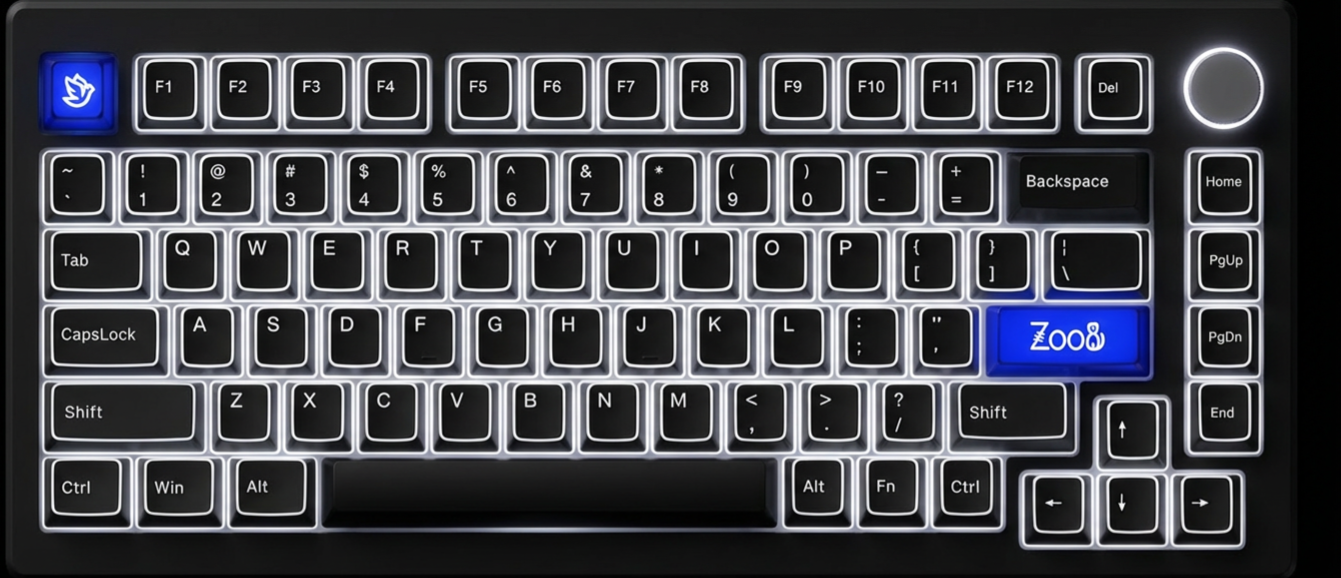
Hold Fn + O for 3 seconds to switch the keyboard to Windows mode. Win/Alt key positions follow Windows layout. The MOD007 V3 QMK uses software-based OS switching, not a physical toggle.
$ Press ESC or click here to go back
Akko MOD007 Keyboard Shortcuts
Akko MOD007 OS Switch
Switch to Windows Mode: Fn + O (hold 3s) — Hold Fn + O for 3 seconds to switch the keyboard to Windows mode. Win/Alt key positions follow Windows layout. The MOD007 V3 QMK uses software-based OS switching, not a physical toggle.
Switch to Mac Mode: Fn + P (hold 3s) — Hold Fn + P for 3 seconds to switch the keyboard to Mac mode. Fn+F1~F12 will provide macOS functions (brightness, Mission Control, Siri, media, etc.).
Lock Windows Key: Fn + Left Win — Disables the Windows key to prevent accidental activation during gaming. Press again to unlock.
Akko MOD007 Fn Layer (Windows)
File Explorer: Fn + F1 — Open Windows File Explorer.
E-mail: Fn + F2 — Open default email application.
Windows Search: Fn + F3 — Open Windows Search.
Browser Homepage: Fn + F4 — Open default browser homepage.
Media Player: Fn + F5 — Open media player application.
Play / Pause: Fn + F6 — Toggle play/pause for media.
Previous Track: Fn + F7 — Skip to previous track.
Next Track: Fn + F8 — Skip to next track.
Calculator: Fn + C — Open the system calculator application.
Mute: Fn + M — Toggle system audio mute.
Volume Down: Fn + , — Decrease system volume.
Volume Up: Fn + . — Increase system volume.
Insert: Fn + Del — Output Insert key.
Swap WASD with Arrow Keys: Fn + W — Swap WASD keys with arrow keys for gaming. Press again to revert.
Akko MOD007 Fn Layer (Mac)
Decrease Display Brightness: Fn + F1 — Decrease screen brightness.
Factory Reset: Fn + ~ (hold 5s) — Hold Fn + ~ (tilde/backtick) for 5 seconds to reset the keyboard to factory defaults. Restores all key mappings and lighting settings.
Enter Bootloader / DFU Mode: Hold Esc → plug USB — Hold Esc while plugging in the USB cable to enter bootloader mode for firmware flashing via QMK Toolbox.
VIA Key Remapping: Connect USB → open VIA — Connect via USB and open VIA (usevia.app) to customize key mappings. The MOD007 V3 QMK supports full VIA real-time remapping across multiple layers.